Walk in with their numbers.
ReviewRay turns a business’s Google Maps listing into an audit report with your logo on it. Use it on a visit, on a call, in an email, or in a meeting.
- Views on the negative reviews and the revenue leak
- How many 5-star reviews it takes to reach the goal
- Unanswered reviews, photo and video counts, days since the last owner update
Open the sample report (PDF) See the price
A Chrome extension for reputation agencies. $7.99 a month for 100 audits.
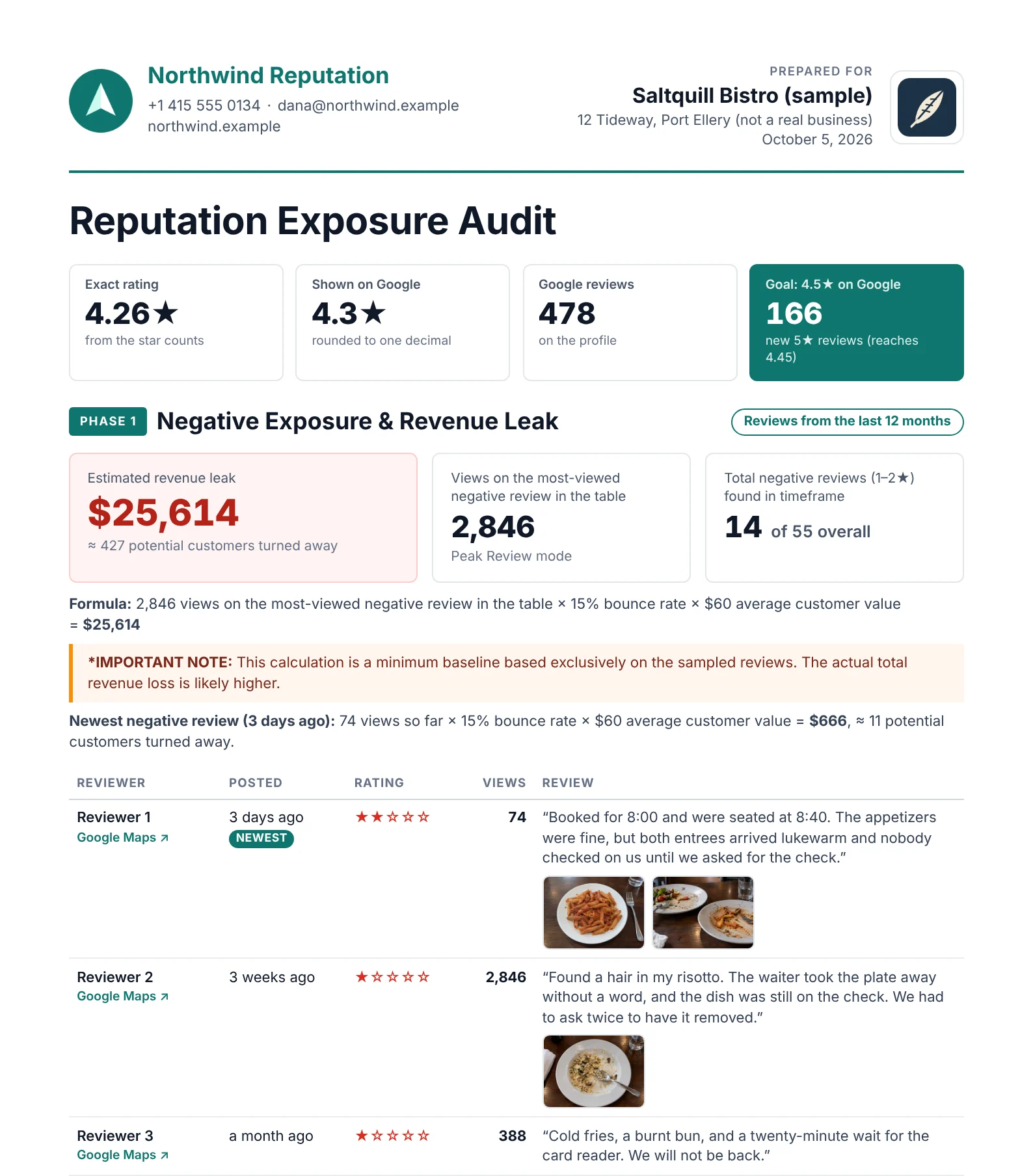
Sample report. The business, the agency, and the reviews are made up. Review photos are AI-generated.
Seven things to say. The report shows each one.
ReviewRay makes a short report for a pitch, not a long study: the sample has 2 pages. It reads the listing live, so every figure it takes from Google Maps is from the day you run the audit. Each line here is something you can say to the owner of the business, with the part of the sample report that shows it.
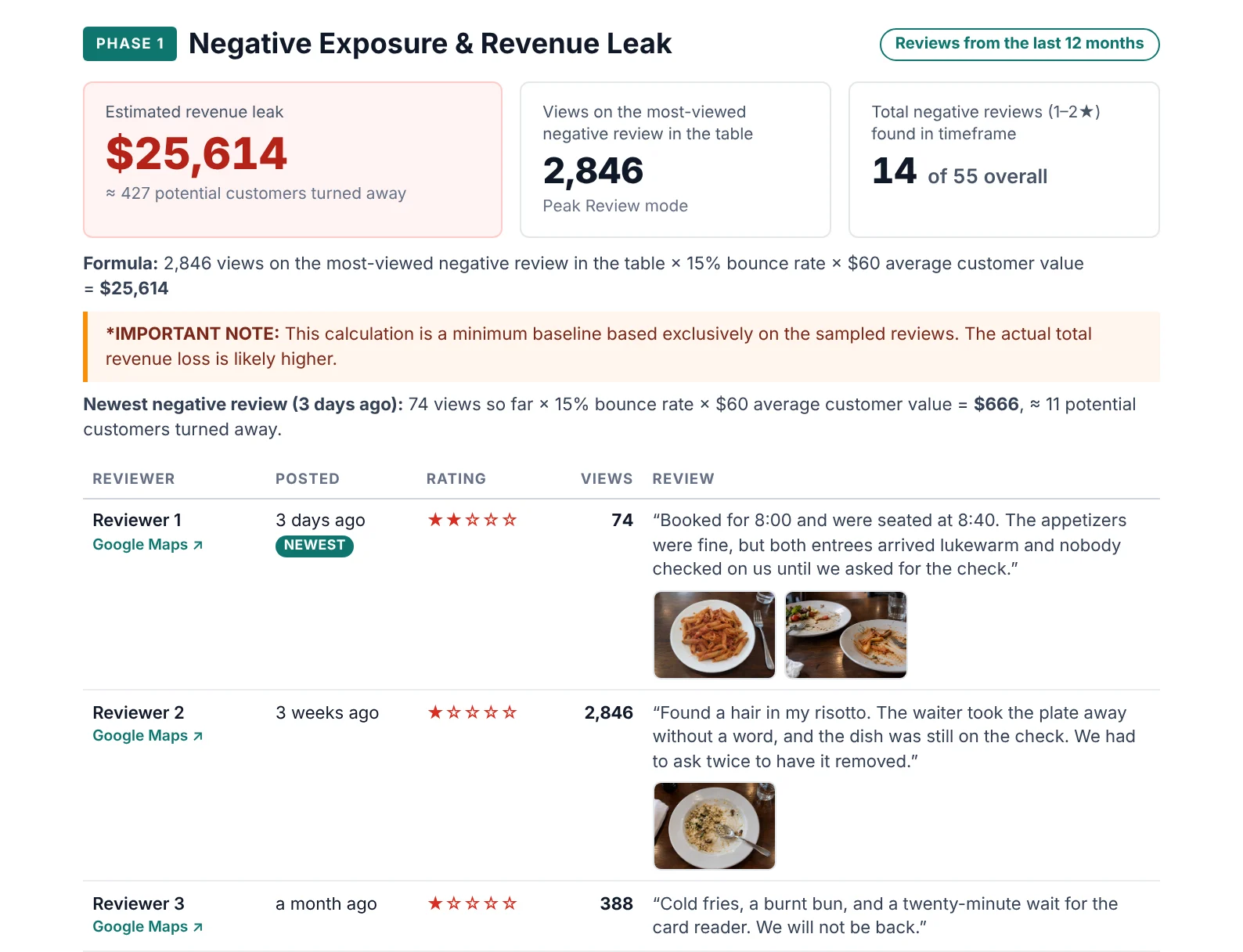
“This one review has been viewed 2,846 times.”
Google counts how often a review is viewed. ReviewRay reads that number in your browser and prints it next to the negative reviews (one or two stars) in the report.
“38 of your 478 reviews have one star.”
This is the star breakdown: the number of reviews for each star rating, from five stars to one. Beside each number, the report shows how much one more review with that rating changes the exact rating: the rating before Google rounds it.
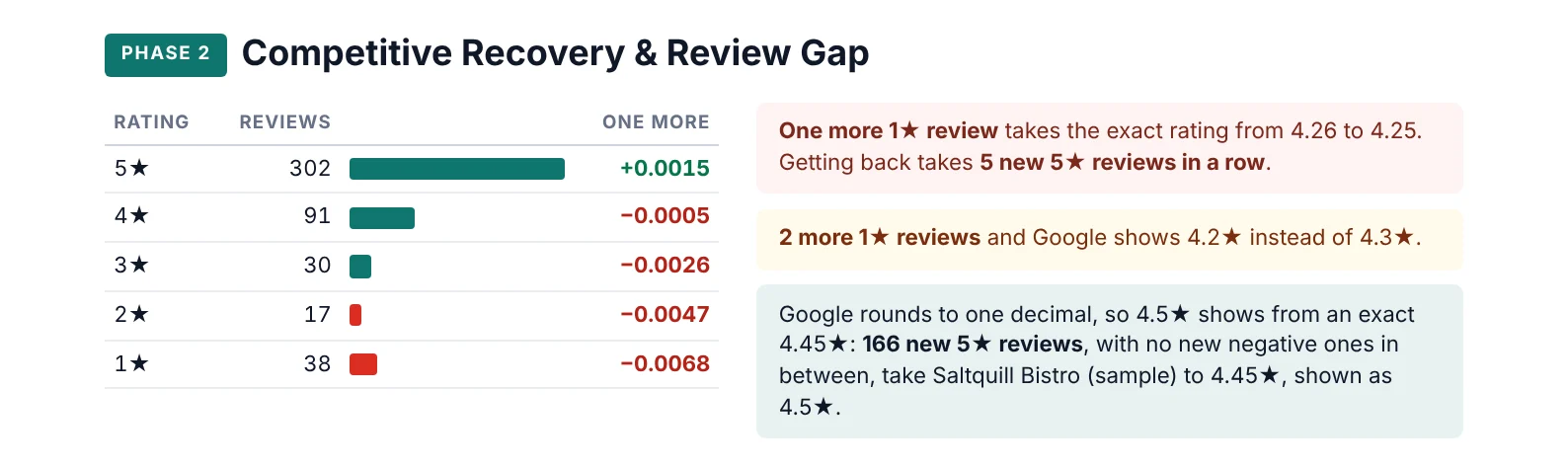
“Google shows 4.3. With 2 more 1-star reviews it would show 4.2.”
Google rounds the rating to one decimal place. The report shows the exact rating behind it, 4.26 here. It also shows how many more 1-star reviews in a row it takes before Google shows a lower rating.
“It takes at least 166 new 5-star reviews for Google to show 4.5.”
You set the target rating. The report calculates how many new 5-star reviews it takes if every new review is a 5-star review. You can also enter how many extra 5-star reviews a month you expect. The report then estimates how long it takes until Google shows the target, or says that this number is not enough.
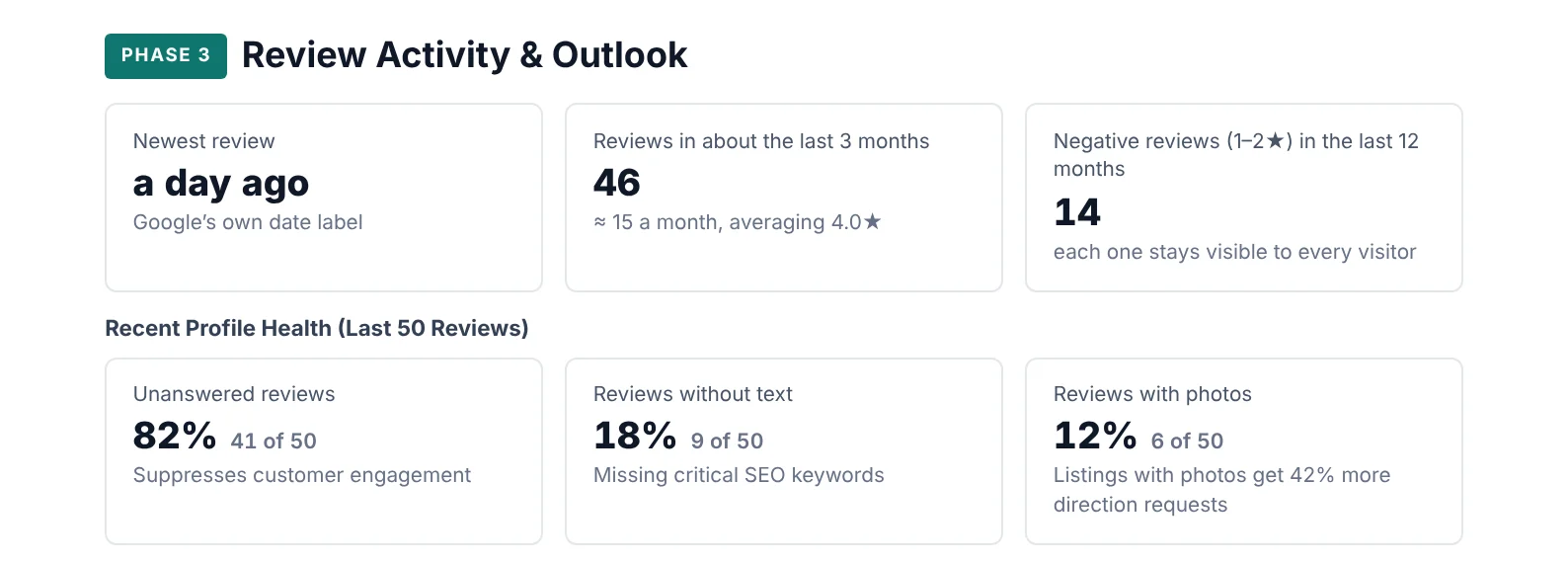
“41 of your last 50 reviews have no answer.”
The part “Recent Profile Health” looks at the newest reviews, up to 50. It counts how many the owner has not answered, how many have no text, and how many have photos.
“You posted 38 of the 642 photos and videos on your listing.”
The part “Profile Content” counts the photos and videos on the listing, how many of them the owner posted, the videos, and the 360° photos apart from Google’s Street View. It also shows how many days ago the owner last posted an update on Google.

“Scan the code and pick a time.”
Near the end of the report is a box with your offer, your name, and your booking link as a QR code. In the PDF, the code is also a link to your booking page.
Not a lead list. A reason to talk.
ReviewRay does not collect businesses. It reads one of them closely and puts what it finds into a short report. Put it on the counter, read from it on a call, or send it as a PDF.
Made for reputation agencies, local SEO freelancers, and the people who sell for them.
| It does not | It does |
|---|---|
| build lists of businesses | audit one listing: the one you have open |
| export spreadsheets | make one report: a page to show now and a PDF to keep |
| keep a record of the businesses you audit | leave the report with you: our server keeps no archive |
| print the name ReviewRay on your report | show your name, logo, and booking link |
Ways to use one report
- On a visit
- Audit the business before you visit, and bring its report.
- On a call
- Audit the business before you call. Then you have its numbers in front of you while you talk.
- In an email or a proposal
- Attach the PDF. The booking link you entered in the popup is in it, as a QR code and as a link.
- In a meeting, in person or on video
- Run the audit live. On the report page, the link beside a review opens it on Google Maps.
- Three months later
- Run the audit again and compare the new report with your first PDF: the rating, and the number of 5-star reviews needed for the target rating.
- When only the recent past counts
- Choose the period for the negative reviews in the report: all time, or a shorter one, down to about one month.
- In the owner’s language
- Switch the report’s own texts to English, French, German, Spanish, or Italian.
- For an owner who should not see a revenue figure
- One switch leaves the estimated revenue leak out of the report.
From the listing to the report in three steps
Open the business on Google Maps
In Chrome, on your computer. Then click the ReviewRay icon: its popup shows the name of the business it is ready to audit.
Click Run Audit
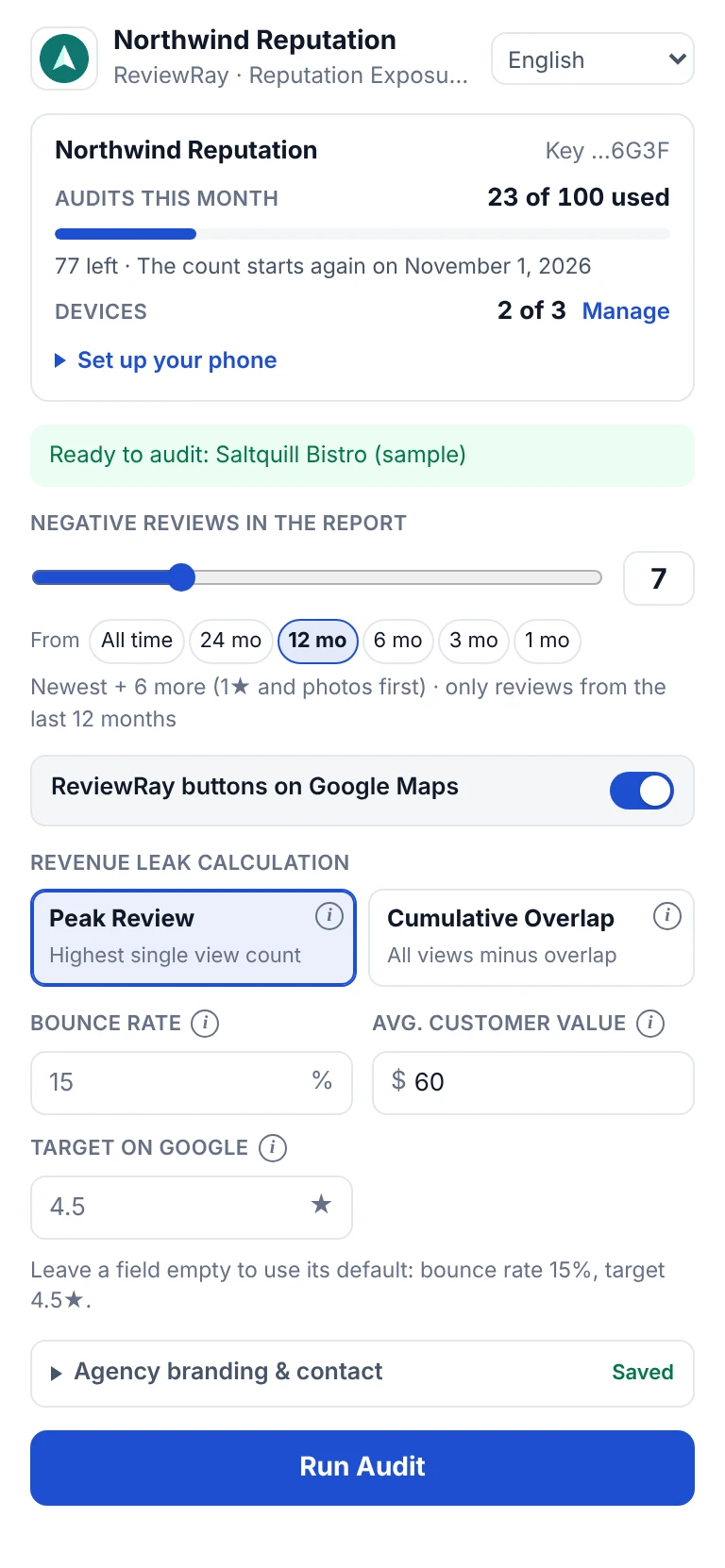
Choose how many negative reviews the report should list, from 1 to 25, and from which period. ReviewRay reads the listing. Then it reads the public profiles of the reviewers it needs, in a small window that closes by itself.
The report opens
On the report page you can change the language and your own figures: bounce rate, customer value, and target rating. Then download the PDF.
ReviewRay is coming to the Chrome Web Store. It is not there yet. Write to support@reviewray.pro, and we will tell you when it is there.
How ReviewRay reads Google Maps
Only in your own browser. It reads the listing you opened and loads the pictures for the report. It reads the public profiles of the reviewers it needs: one at a time, at least 1 second apart, and at most 60 in an audit. Then it opens a Google Search page about the business once, to read the social profiles and how many products Google shows for it. It never signs in for you. If Google shows a CAPTCHA or answers “too many requests” while it reads the profiles, it opens no more profiles, and no Google Search page, in that audit. The data for the report goes to our server, which builds the report. Our server never contacts Google.
One plan
$7.99 a month
or $69 a year, which is $5.75 a month
If you use all 100 audits, one audit costs about 8 cents.
- 100 audits a month
- Your key on 3 devices
- Reports in 5 languages
- Your own brand on every report
ReviewRay is coming to the Chrome Web Store. It is not there yet. Write to support@reviewray.pro, and we will tell you when it is there.
Made for agencies, freelancers, and other professionals. Prices are in US dollars. No VAT is added to these prices (§ 19 UStG, the German small-business rule).
Good to know
What do I need?
Chrome 116 or newer on a computer, and a license key. Use Google Maps at www.google.com/maps and sign in to Google first: when you are signed out, Google Maps may show fewer reviews.
How do I install it?
ReviewRay is coming to the Chrome Web Store, and it is not there yet. When it is, you add it to Chrome from the store and enter your license key. Write to support@reviewray.pro, and we will tell you when it is there.
What counts as an audit?
A report that was built. An audit you cancel does not count. The count starts again on the first day of each month (UTC). With one key, one audit runs at a time.
Why do some audits take longer than others?
ReviewRay reads the listing live in your browser, so the time an audit takes depends on your internet connection and on the listing. For each review in the report, ReviewRay opens the reviewer’s public profile to read the view count, one profile at a time. A private profile has no public count: ReviewRay skips that review and reads the next one. More reviews in the report, or many private profiles, make an audit longer. Keep the Google Maps tab visible until the report opens.
Which reviews are in the report?
Google reviews of one listing. The star breakdown covers every review. The table lists 1-star and 2-star reviews from the period you chose, up to 25 of them. The audit starts with a few of the newest reviews: the first of them with a public view count goes into the report. After that it takes reviews in this order: 1-star with photos, 1-star without, 2-star with photos, 2-star without. In each of these groups it takes the newest and the oldest of those left, in turn. The first time it takes the oldest one, it also reads the next oldest in that group and takes the one viewed more often first. In the table the newest one comes first, then the others from the newest to the oldest. If two of the others have the same age, the one viewed more often comes first.
Does the report show the star breakdown?
Yes. It shows how many reviews the listing has for each star rating, from five stars to one. ReviewRay reads these numbers from the listing in your browser, and the report calculates the exact rating from them. If ReviewRay cannot read them, the report page tells you.
Where do the view counts come from?
From Google. The Google Maps app shows the number on the reviewer’s profile, so you can check a count there. ReviewRay reads the same number in your browser. When a reviewer’s profile is private, there is no public count, and the audit uses the next review.
Is the revenue leak a measured figure?
No. It is an estimate, and the report calls it one. In the usual mode it multiplies the views on the most-viewed negative review in the table by your bounce rate and your average customer value. The bounce rate is the share of views you count as a lost customer. In the other mode it first adds up the views of all reviews in the table and subtracts a share that you set. Then it multiplies in the same way. The result is never lower than in the usual mode. You can leave the estimate out of the report.
How long do I have the report?
Download the PDF and it is yours. The report page stays online for up to 30 minutes, then we delete it. We keep no archive of your reports.
Does the owner see the name ReviewRay?
Not in the report, and not in the PDF you download: both show your name and logo. The owner can see the name where the extension itself shows it: its icon and its popup in Chrome, its “ReviewRay audit” buttons on Google Maps, and the card over Google Maps while an audit runs. And in the address of the report page, which starts with app.reviewray.pro. A browser can also print that address at the foot of a printed page.
Why does the report say “Reviewer 1”?
The report is about the business, not about the people who wrote the reviews. Every review is quoted from Google Maps. On the report page, the link beside a review opens the original.
Is ReviewRay a Google product?
No. ReviewRay is an independent tool. It is not made by Google and not connected with Google.